15-494/694 Cognitive Robotics: Lab 6
I. Software Update and Initial Setup
At the beginning of every lab you should update your copy of vex-aim-tools. To do this:$ cd vex-aim-tools $ git pull
II. Path Planning
The vex-aim-tools package now offers simple wavefront and RRT path planners that allow you to send the robot to an object or a point in space while avoiding obstacles.- Download Lab6a.fsm to your Cognitive Robotics folder and read it. This program is based on PathPlanner.plan_path(), which uses the wavefront path planner to find a path to an object.
- Compile Lab6a using genfsm.
- Run the program by typing "simple_cli Lab6a".
- Position an orange barrel where the robot can see it. This is your target object.
- Position a blue barrel between the robot and the orange barrel. You may have to offset it slightly so that both barrels are visible.
- Type "tm" in simple_cli to proceed.
- How are the objects represented in the wavefront display? Take a screenshot.
- How is the generated path shown in the path viewer display? Take a screenshot.
- See if you can force a more circuitous path by adding additional blue barrels or AprilTags as obstacles. Take a screenshot. Note: For efficiency reasons, AprilTag detection is now disabled by default. Lab6a enables it by doing TagDetection(enabled=True).
III. Path Planning In A Complex Space
- Set up a more complex obstacle field using barrels and AprilTags surrounding the robot, so it has to take a more circuitous route to escape.
- Run Lab6a but don't type "tm" yet.
- Drive the robot so it can observe all the obstacles you've set up and build a complete world map. Make sure the orange barrel is present as well.
- Now type "tm" to invoke the path planner and take a screenshot of the reults.
IV. Path Planning Failure
- Set up the orange barrel so that it's surrounded by obstacles and cannot be reached without the robot colliding with one of them.
- Run Lab6a. What result do you get? Document with a screenshot.
V. RRT Path Planning
- Download Lab6b.fsm to your Cognitive Robotics folder and read it.
- This program works like Lab6a, using the orange barrel as a goal. The difference is that it uses the RRT-connect path planner. You can see the two trees (green and blue) in the path_viewer window, along with the recovered, smoothed path (red). The planner tries to put the robot's base frame (center of the body) exactly where the orange barrel is located, so the robot will end up pushing the orange barrel out of the way. To prevent this, pick up the orange barrel once the robot starts moving. Note that if the blue barrels are too close to the orange barrel, the robot will not be able to occupy that space without a collision, so you will get a GoalCollides error. If the blue barrels are close but not too close, the path planner will devise a complex path to nestle the robot in among the barrels without hitting them. Play with different obstacle configurations to demonstrate all three outcomes: simple success, GoalCollides, and complex path. Take a screenshot illustrating your results (both conole output and path viewer display.)
VI. Homework
The robot's built-in barrel detection code is overly sensitive to lighting conditions. It also has some bounding box accuracy issues at larger distances because it's actually running on a half-resolution image (320 x 240). Can we do better? Write code to detect barrels in a camera image and return a set of detections and bounding boxes of form ("OrangeBarrel", topleft-x, topleft-y, width, height). To avoid spurious barrel detections you'll want to see either two orange regions sandwiching a blue region, or vice versa. But you'll have to relax this requirement if the barrel is very close to the robot, where you can only see the top. Also, one barrel can partially occlude another, as in the image below, so you'll need to allow for that.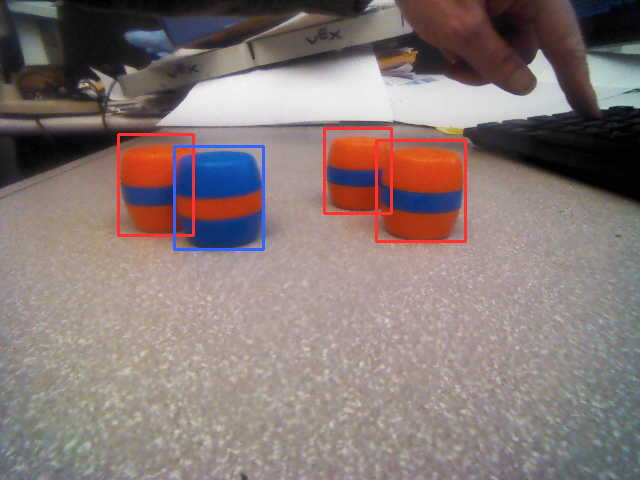
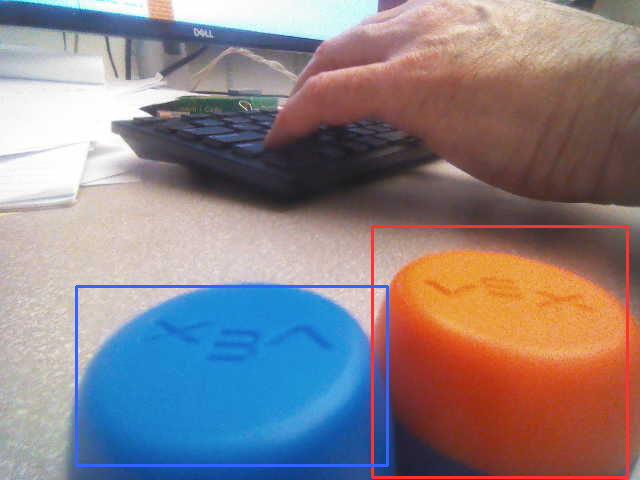
In the OpenCV lecture you saw some crude code for color image segmentation. You can start with that. Don't use connected components labeling because it's brittle: if two barrels overlap in the camera image it will merge them into one. Instead, since barrels are roughly rectangular, a template matching approach should work well. Strategy: Since most of you are new to OpenCV, rather than writing all the code from scratch, you are encouraged to use an LLM to help you. See this conversation with ChatGPT-5.2 for inspiration. But you are not required to follow the watershed approach recommended in that conversation; you are free to use any approach you like. It's a good idea to use matplotlib when developing your code, because its imshow method provides an easy way to display things like watershed computations by automatically scaling images and applying a color map. See the watershed.py demo (requires water_coins.jpg) for sample code. But you can't use matplotlib with simple_cli, so grab some screenshots using the camera viewer and then use those files as input to your Python program. To save the current camera image, type "s" in the camera viewer. Your code also needs to work for barrels that are so close to the camera that only the upper portion of the barrel is visible, as in the example below. This will require a different strategy since you won't see the usual O-B-O or B-O-B banding pattern. Note that this situation only occurs when the top of the barrel is in the bottom half of the image.
Once your code is working as desired, you can move it to a state machine program. Test your barrel detector under varying lighting conditions and include screenshots showing the current camera image with the detected bounding boxes drawn on top of it. You can use cv2.rectangle() to draw bounding boxes on top of an image, and use the vex-aim-tools imshow() function to display the result in your own window instead of the regular camera viewer window. Your screenshots should show both your window and the camera viewer window so we can compare the accuracy of the bounding boxes.
What to Hand In
Hand in a zip file containing the following:- A PDF file (not DOCX or RTF) with your narrative describing the experimentation you did in parts II through V.
- Your solution to the homework problem (barrel detection) with supporting screenshots, and a brief summary of what LLM you used and what your interaction was like.