Name(s): ________________________________________________
15-494/694 Cognitive Robotics Lab 7:
Convolutional Neural Networks
I. Software Update and PyTorch Setup
At the beginning of every lab you should update your copy of the
vex-aim-tools package. Do this:
$ cd ~/vex-aim-tools
$ git pull
In addition, you will need to install some packages. First, activate the
same Python virtual environment you use to run simple_cli. Then do the following:
$ pip install torch torchvision ultralytics
Note: if you're using Virtual Andrew and run out of disk space, you
may need to create a Python environment in C:\Users\myuserid instead of
in the default Desktop location in the andrew.ad.cmu.edu file
system.
II. Experiments with the MNIST Dataset and Linear Models
You can do this part in teams of two if you wish. When answering the
questions below, you are encouraged to refer back to the lecture
slides.
- Make a lab7 directory.
- Download the file
mnist.zip into your lab7
directory.
- Unzip the mnist.zip file and look inside your mnist directory.
- Skim the mnist1.py source code. This is a linear neural
network with one layer of trainable weights.
- Have a look at
the PyTorch
documentation, and specifically the documentation
for torch.nn.Linear.
- Run the model by typing "python3 -i mnist1.py". The "-i" switch tells python not to exit
after running the program. Press Enter to see each output unit's weight matrix, or
type control-C and Enter to abort that part.
- Try typing the following expressions to Python:
- model
- params = list(model.parameters())
- params
- [p.size() for p in params]
The first parameter is the 784x10 weight matrix; the second one is the 10 biases.
- How long did each epoch of training take, on average? ________________
- If your laptop has a GPU, modify the model to use the GPU
instead of the CPU. (You just have to uncomment one line and
comment out another.)
- Run the model on the GPU if you can. How long does each epoch
take now? ________________
Are you surprised? GPUs don't
help for small models. A few thousand weights is small.
- If you run mnist1 a second time, you won't get exactly the same result. Give
two reasons for this: ________________________________________________
________________________________________________________________
- Skim the code for the mnist2 model. This model has a hidden
layer with 20 units. Each hidden unit is fully connected to the
input and output layers.
- Run the mnist2 model on the CPU. How long does each epoch of
training take, on average? ________________
- You can use the show_hidden_weights() and show_output_weights() functions to display
the learned weights.
- If you have a GPU available, modify the mnist2 code to run on
the GPU. How long does each epoch take now? ________________
III. Experiments with the MNIST Dataset and a Convolutional Model
You can do this part in teams of two if you wish.
- Skim the code for the mnist3 model.
- Run the model on the CPU. Look at some of the kernels the
model learns.
- How many parameters does this model have, where each parameter
is a tensor? ________________
- What are each of the parameters of this model? Describe them in
English. ________________________________________________
________________________________________________________________
- Note that two of the parameters are batch normalization values
(means and variances) created by the BatchNorm2D layer. The rest
are weights. (Biases are considered to be weights.) Looking at
the sizes of the various weight and bias tensors, how many total
weights does this model have? Show your calculation.
____________________________________
A convolutional neural network is a "virtual" network where each
kernel is replicated many times, but we don't actually build out
all the units and connections as individual data structures, since
they share the same weights. When running data through the
network, though, we still have to do all the multiply and
accumulate operations as if we had built out the network, so the
number of "effective" weights is many times the number of weight
parameters. How many effective weights are in the mnist3 model?
Show your calculation.
________________________________________________
- If you are able to run this model on the GPU, how long
does each epoch of training take, on average? ________________
IV. Object Recognition with MobileNet
You can do this part in teams of two if you wish.
- Run the MobileNet demo
on the robot. Note: to install this demo you must download both MobileNet.fsm
and the labels.py file found in the same directory.
- Use your cellphone to call up a picture of a cat and show it to the robot.
- Type "tm" to tell the program to proceed with recognition. Did it recognize the cat?
- Try some dog breeds, and some other object classes such as airplanes or cars.
What is the most obscure dog breed you got it to recognize? ____________________
How does the model behave when shown right-side-up vs. upside-down pictures of sportscars?
________________________________________________________________
How does the model behave when shown right-side-up vs. upside-down pictures of tabby cats?
________________________________________________________________
V. Homework Part A
In this assignment you will train a CNN to recognize dominoes. A
domino is described by the number of pips in each half, with the
larger number always written first, e.g., 5-2, never 2-5. We're using
a "double six" domino set, which means the highest domino is the 6-6
and the lowest is the 0-0. There are a total of 28 unique
combinations. Therefore you will be solving a 28-way image
classification task. Our dominoes have colored pips, which makes
the classfication easier.
We've already done a lot of the work for you: (1) we assembled a
dataset of 2000 domino images with class labels, (2) we wrote code to
load the dataset and augment it by introducing small shifts, small
rotations, and random flips, and (3) we wrote code to train a CNN
classifier on this dataset, holding out some examples for a validation
set used for early stopping, and some more for a test set to measure
the trained model's performance. We used a "stratified split"
strategy to split up the 2000 images in a way that ensures that each
class is proportionally represented in the training, validation, and
test sets.
The performance of the trained model is awful. This is because we're
using a lame CNN with only one convolutional layer. It needs more.
Your job will be to design a better CNN.
- Download these files into your lab7 directory:
domino_dataset.pt,
train_domino_cnn.py,
utils.py,
DominoCNN.py.
- Browse the code to get an idea of what it does.
- Run the model by doing "python -i train_domino_cnn.py". Study
the output.
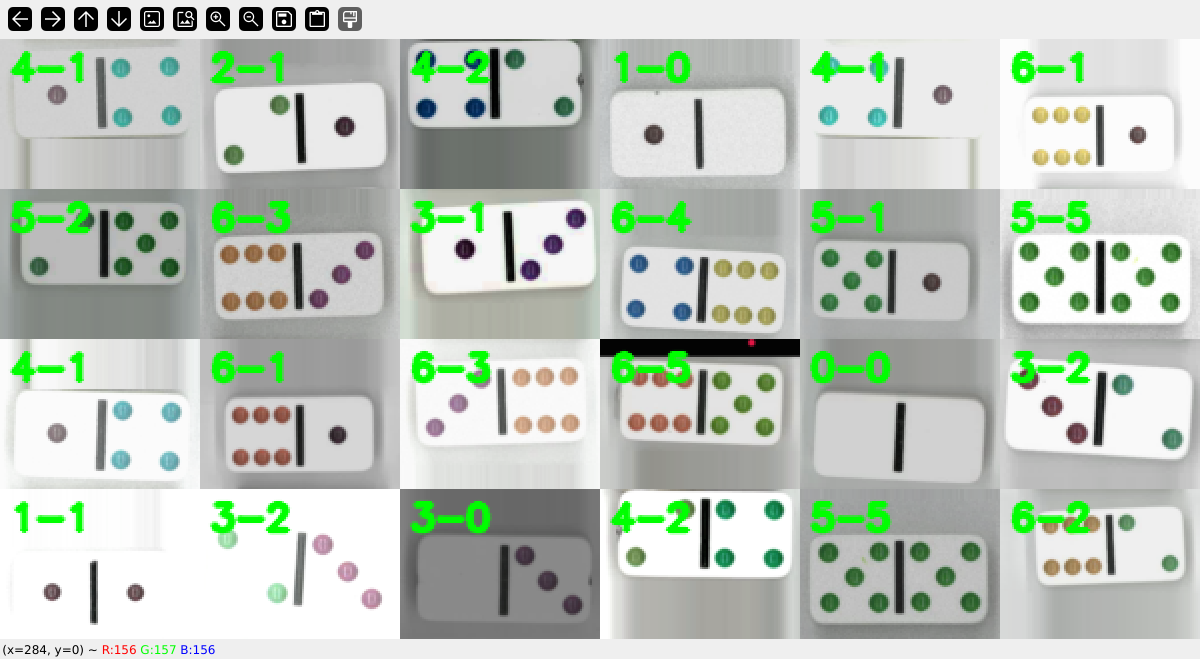
- Type "show_grid(train_dataset)" to see a random sample of
training data. You can repeat this several times. You can also
use show_grid to examine val_dataset and test_dataset. The display
looks like this:
- Design a better version of DominoCNN that uses more
convolutional layers to do a better job. You can ask ChatGPT for
advice on how layers to use and how many kernels each layer should
have. It is possible to achieve more than 99% accuracy on the
test set if you choose a good architecture.
VI. Homework Part B
In this part of the homework you will use a YOLO ("You Only Look
Once") domino detector to find a domino in the current camera image.
We've already trained the detector for you. Its output looks like
this:
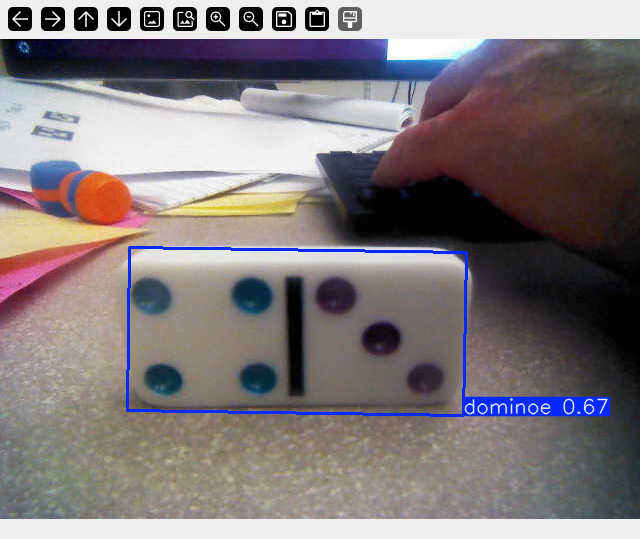 Your job will be to use the bounding box from the domino detector to
extract the domino from the image, pad and rescale it so it looks like
the CNN training data, and then run it through the CNN to recognize
the domino.
To try the YOLO domino detector, download the file
yolo_best_weights.pt and run
DominoYOLO.fsm. The result obtained from
the domino detector has an object bounding box (obb) that can be read
in several formats; try result.obb.xywhr for a simple axis-aligned
rectangle. You can also try
out DominoRealTime.fsm for continuous
real-time domino detection without having to type "tm".
At the end, you should have a state machine program called
DominoClassifier.fsm that waits for you to type a "tm" and then grabs
a camera image, locates the domino, classifies it, and says something
like "I see a 6-3 domino!" or "I don't see a domino", and then waits
for the next "tm".
To solve this problem you will need to learn how to load the saved
model that you trained in Part A, and then how to use that model to
classify a single image and find the class id string, e.g., "6-3".
We will have a domino set in the lab that you can use for live testing.
Your job will be to use the bounding box from the domino detector to
extract the domino from the image, pad and rescale it so it looks like
the CNN training data, and then run it through the CNN to recognize
the domino.
To try the YOLO domino detector, download the file
yolo_best_weights.pt and run
DominoYOLO.fsm. The result obtained from
the domino detector has an object bounding box (obb) that can be read
in several formats; try result.obb.xywhr for a simple axis-aligned
rectangle. You can also try
out DominoRealTime.fsm for continuous
real-time domino detection without having to type "tm".
At the end, you should have a state machine program called
DominoClassifier.fsm that waits for you to type a "tm" and then grabs
a camera image, locates the domino, classifies it, and says something
like "I see a 6-3 domino!" or "I don't see a domino", and then waits
for the next "tm".
To solve this problem you will need to learn how to load the saved
model that you trained in Part A, and then how to use that model to
classify a single image and find the class id string, e.g., "6-3".
We will have a domino set in the lab that you can use for live testing.
Hand In
Hand in your written responses to the MNIST questions at the end of
today's lab. Be sure to put your name on the sheet
Hand in a zip file in Canvas containing: your modified DominoCNN.py,
your saved best weights file, a text file contining the output of
your training run, and your DominoClassifier.fsm file. Do not
include all the training data in your zip file!
|